Crunchtime Kitchen – TCP setup from the Point of Sale
Using TCP Communication provides greater stability for network traffic and decreases the likelihood of lost messages. It also supports PCI compliance regulations. To allow Crunchtime Kitchen to receive messages from the POS using TCP, or to set up TCP communication for the Point of Sale, please follow the steps below.
Crunchtime Kitchen:
Vereiste onderdelen:
- QsrPOSi.dll of QSRSock.dll- Let op: niet alle POS'en gebruiken deze .dll in hun integratie.
- QsrSock.xml
By default, the QSRPosi.dll uses UDP broadcasts for communicating with Crunchtime Kitchen. This file is placed peer to the POS executable.
Om TCP-communicatie mogelijk te maken, moet de QSRSock.xml worden gekopieerd naar de gemeenschappelijke map applicatiegegevens
op elke POS-terminal of peer naar het POS-besturingsprogramma.
De QSRSock.xml bewerken:
POS TCP-communicatie:
- Als de QSRSock.xml er eenmaal is, moet deze worden bewerkt om het juiste IP-adres van de QSR-server op te nemen.
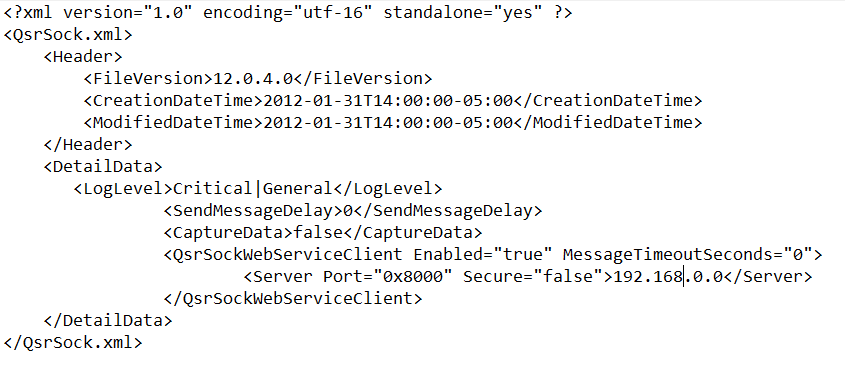
- Het volgende bestandspad moet ook worden aangemaakt: C:\Programmagegevens.\QSR Automations\ConnectSmart.\QsrSock.\Data
POS TCP-communicatie:
- Als de POS de QsrPOSi.dll integratie gebruikt, moet de QsrSock.xml in C:\ProgramData\QSR Automations\ConnectSmart\QsrSock\Data op elke POS terminal worden geplaatst. Je kunt ook een logboekmap aanmaken in de QsrSock-map waar een logboekbestand wordt gegenereerd. Als de POS de QsrSock.dll integratie gebruikt, moet de QsrSock.xml gelijktijdig met de POS executable worden geplaatst (dit is dezelfde map waar het QsrSock.dll bestand bestaat en is meestal een Bin).